
WEEX Order History: How Orders, Fills and Fees Fit Together

 Prefer us on Google
WEEX order history shows what you asked the exchange to do: each order, its price, size, type and final status. It does not, on its own, show exactly what executed or what you paid. That lives in a second record, the trade or fill history, where every individual match appears with its own price, quantity and fee, while a third record, your asset or funding history, shows how your balances actually moved.
Most confusion about "missing" fees or odd average prices comes from reading one record as if it were another. A single limit order can be matched against several counterparties at different prices and times, and each match is charged separately.
This guide covers what each record is for, a worked example of one BTC/USDT order that turns into four fills with four separate fees, where trading fees show up, what WEEX has documented about exporting your history as of October 2026, and a simple routine for reconciling all three records.
Order History, Trade History and Asset Records: Three Different Ledgers
- Order history: what did I ask for? One line per order: type, side, limit price, requested quantity, executed quantity, and a status such as filled, partially filled or canceled. Canceled orders stay listed, which helps you confirm a cancel went through.
- Trade or fill history: what actually happened? One line per match. If an order was filled in four pieces, you see four lines, each with its own execution price, quantity, time and fee.
- Asset, funding or bill records: how did my balance change? One line per balance movement. Trades appear here as money in and money out, next to deposits, withdrawals, transfers between your spot and futures accounts, and rewards.
WEEX's own spot API makes this split explicit. As of October 2026, its documentation lists separate endpoints for historical orders, for your own trades (each with a commission field), and for account bills, whose business types include trade_in, trade_out, deposit, withdraw, transfer_in and transfer_out. In-app labels may differ by version, but orders, fills and balance movements are kept apart.
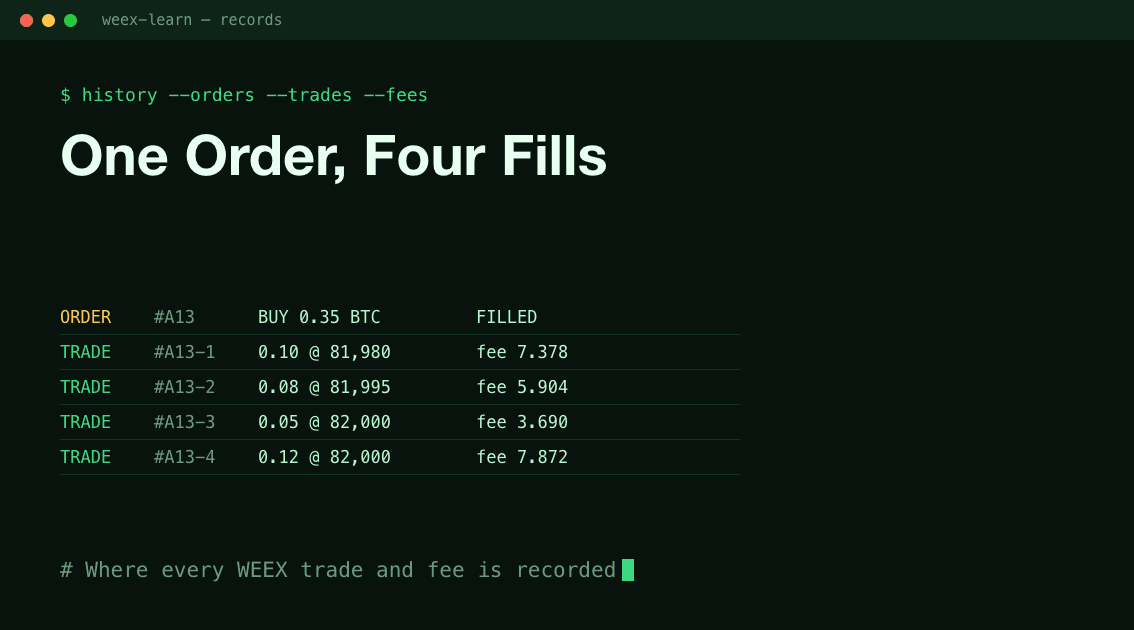
Worked Example: One BTC Order, Four Fills, Four Fees
Here is how a single order fans out. Prices are illustrative. The fee rates are WEEX's VIP 1 spot rates from the WEEX fee page as of October 2026, used because at VIP 0 maker and taker are both 0.100% and the difference would disappear.
You place a limit buy for 0.35 BTC on BTC/USDT at 82,000 USDT. At that moment the order book has sellers at 81,980, 81,995 and 82,000. That means a 0.090% taker fee and a 0.080% maker fee; assume the fee is charged in USDT.
- Fill 1: 0.10 BTC at 81,980. Value 8,198.00 USDT. Your order took liquidity, so it pays the taker rate: 7.378 USDT.
- Fill 2: 0.08 BTC at 81,995. Value 6,559.60 USDT. Taker fee: 5.904 USDT.
- Fill 3: 0.05 BTC at 82,000. Value 4,100.00 USDT. Taker fee: 3.690 USDT.
- The book at 82,000 or better is now empty. The remaining 0.12 BTC rests in the book as a maker order.
- Fill 4, twenty minutes later: a seller hits your resting bid. 0.12 BTC at 82,000. Value 9,840.00 USDT. Maker fee: 7.872 USDT.
Now compare what each record shows.
Your order history has one line: limit buy, price 82,000, quantity 0.35, executed 0.35, status filled. Depending on the view, it may show an average price of about 81,993.14 USDT, which is the total value of 28,697.60 divided by 0.35. That average is lower than your limit price because three of the fills happened below it.
Your trade history has four lines with four different fees adding up to 24.844 USDT. That is an effective rate of about 0.087%, not a flat 0.090%, because the last fill was charged as a maker.
Your asset records show USDT going out and BTC coming in, with the fees reflected in the net change.
If the fee in your head is "0.35 BTC times 82,000 times 0.090%," or 25.83 USDT, you will think about 1 USDT is missing. Nothing is. Three pieces filled below your limit and one was charged a maker rate. Only the fill lines show that.
Where Trading Fees Appear on WEEX
Fees are charged per fill, so trade history is the first place to look. Each line carries its own fee; the order line may summarize it or leave it out.
Two points catch beginners:
- The fee asset may not be the one you expect. Some exchanges deduct the fee from the asset you receive (BTC on a buy), others from the quote asset (USDT). WEEX's API documents a commission amount per trade but no separate fee-currency field, so read the currency in the in-app fill details.
- One order can pay both maker and taker rates, as the example shows. If your effective rate looks off, check which fills rested in the book and which crossed it.
Current WEEX rates by VIP level, for spot and futures, are on the WEEX fee page. Check it rather than a number quoted elsewhere, because rates and tiers change.
On futures, funding payments are not trading fees. They show up as balance movements, not fills, so a futures account can change value with no new trade in your fill history. WEEX Learn's guide to how perpetual futures, margin and liquidation work covers where those costs come from.
-- Price
Can You Export WEEX Order History?
What can be confirmed as of October 2026:
- API access is documented. WEEX's spot API lets you query historical orders and your own trades for a symbol. By default, a query covers the last 7 days. One request can span at most 90 days, and only the last year of data can be queried. Separate endpoints cover account bills, funding bills and transfer records. This is the most reliable route if you need a complete trade file, for example for tax software.
- An in-app CSV export is not described in WEEX's help center as of October 2026. Third-party tax tools refer to downloading a transaction history file from WEEX, but WEEX itself has not published the steps. Open the history page on web or in the app and look for a download or export icon. If you see none, ask WEEX support before you rely on it.
Because of the one-year limit, save your history at least quarterly if you need it for taxes.
A Five-Minute Reconciliation Routine
When a balance or fee looks wrong, work from the order down:
- Find the order in order history and note its executed quantity and status. "Partially filled, then canceled" often explains it.
- Open the matching fills in trade history and add up quantity and value. They should match the order's executed quantity and total.
- Add the fees across those fills, noting the currency of each.
- Check the asset records for the same time window. The trade-in and trade-out entries, net of fees, should explain the balance change.
- Anything still unexplained is usually a non-trade movement: a transfer between accounts, a funding payment, a reward or a withdrawal.
For how orders sit in the book before they fill, see WEEX Learn's guide to the buy limit order. Read this way, WEEX order history is an index that points you to the fills that matter.
FAQ
1. Why does my WEEX order show "filled" but at a different price than I set?
A limit order fills at your price or better. If sellers were available below your buy limit, part or all of the order executed there, and the order line shows the average of those fills.
2. Why is a canceled order still in my order history?
Order history records every instruction, including canceled ones. Check the executed quantity. If it is above zero, part of the order filled before the cancel, and those fills appear in trade history with their fees.
3. Is the trading fee included in order history or trade history?
Fees are charged on each fill, so trade history is the place to see them line by line. Asset records then reflect the net effect on your balances.
4. How far back can I see my WEEX trade history?
Through WEEX's documented spot API, only the last year can be queried, with up to 90 days per request, as of October 2026. Save your records regularly if you need them for longer.
This content is provided for general informational purposes only and doesn't constitute financial, investment, legal, or tax advice. Any events, rewards, online promotions, or related information mentioned herein should not be considered a recommendation, solicitation, or invitation to purchase, sell, trade, or otherwise deal in any crypto assets. Crypto assets are highly volatile and may result in loss. The availability of WEEX services, products, and related events may vary by region. You are responsible for ensuring that your participation is in accordance with applicable local laws and regulations.
You may also like
WEEX Futures PnL: Why Your Three PnL Numbers Rarely Match
WEEX Reduce-Only Order: What It Does and When It Gets Cancelled
WEEX Stop Loss Not Triggered? Check the Trigger, Then the Fill
WEEX Funding Fee Explained: Rate, Countdown, Records and Math
WEEX Trading Pair Suspended or Delisted? Your Orders and Assets
WEEX Minimum Order Size Errors Explained With Rounding Examples
Cancel WEEX Spot Order: What Returns to Your Balance and When
WEEX Limit Order Not Filled? Read the Book, Then Fix the Order
How to Spot Trade on WEEX: From Pair Choice to a Confirmed Fill
How to Convert ETH to USDT on WEEX: Step-by-Step Guide
How to Convert USDT to BTC on WEEX: Step-by-Step Guide
How to Convert BTC to USDT: A Step-by-Step WEEX Guide
BTC Funding Rate and Open Interest: What Each One Measures and How to Read Them Together
How Transparent Is a Crypto Exchange? Checking Proof of Reserves and Protection Funds
How to Use the WEEX Trust Center: Check Reserves, Protection Fund and Official Contacts
Crypto Leverage Trading Explained: How Perpetual Futures, Margin and Liquidation Work
Bitcoin Margin Trading: BTC Liquidation Math at 3x, 10x and 25x
Crypto Leverage Trading Platform: 6 Checks Before You Deposit
What Is Margin Trading? A $1,000 Example at 3x and 10x Leverage
How to Day Trade Crypto for Beginners: The Math Behind One Trade
Trading Psychology for Beginners: Crypto Traps and Hard Rules
What Is a Bitcoin ETF? How Creation, Custody and Fees Work
What Is Blockchain and How Does It Work? One Transaction, Traced
WEEX Convert Fees: What Zero-Fee Conversion Really Costs You
WEEX Convert Quote: How the 8-Second Price Lock Really Works
WEEX Convert Limits: Minimum and Maximum Amounts Explained
How to Check a WEEX Convert Order: History, Rate and Status

USDC Significant EMT Status in the EU: What Changes on November 12 Under MiCA
Walrus (WAL) Jumps 30%: Sui Storage Token Rallies on AI Data
Bitcoin Price After Hot CPI: Why BTC Is Pinned Near $82,000
WEEX Futures PnL: Why Your Three PnL Numbers Rarely Match
WEEX Reduce-Only Order: What It Does and When It Gets Cancelled
WEEX Stop Loss Not Triggered? Check the Trigger, Then the Fill
WEEX Funding Fee Explained: Rate, Countdown, Records and Math
WEEX Trading Pair Suspended or Delisted? Your Orders and Assets
WEEX Minimum Order Size Errors Explained With Rounding Examples





