


WEEX Limit Order Not Filled? Read the Book, Then Fix the Order
A WEEX limit order not filled almost always means one of three things: the market never traded at your price, it traded there but orders placed before yours absorbed the volume, or your order filled only in part and the remainder is still waiting. A limit order guarantees your price, never your fill, and orders match by price first and time second.
The fastest way to diagnose it is to read the order record before touching anything. Executed quantity, remaining quantity and status tell you which of the three cases you are in, and the right response, whether to wait, re-price, cancel or switch to a market order, follows from that.
Below is a worked BTC/USDT order-book example that shows exactly how a buy at a "touched" price can end up with zero BTC, then partial BTC, plus what each status means and what each fix costs you. The queue logic is the same on WEEX futures, and interface labels can differ slightly by app version.
Start With the Order Record, Not the Chart
Open the orders area of the trading page and find the order. WEEX's own guidance is to check Open Orders and Order History and to compare executed and remaining quantities, because an open order has not necessarily filled.
WEEX's spot API documents these order states, and the interface reflects the same lifecycle even if the wording differs:
- New (open, nothing filled). The order is resting on the book. Executed quantity is 0.
- Partially filled. Some quantity has traded; the remainder is still live at your price.
- Filled. Complete. The record moves to history with an average fill price and fee.
- Canceled. You or the system removed it. Anything already executed stays executed.
- Expired. Typical for IOC or FOK orders that could not match on arrival. WEEX's spot API supports GTC, IOC and FOK time-in-force for limit orders, so a "limit order that vanished instantly" is often an IOC or FOK that found no liquidity.
If the order is not in Open Orders at all and not in history, it was probably never accepted. Common reasons are an amount below the pair's minimum, a price outside the allowed band, or insufficient available balance.
Price Not Reached: The Most Common Reason
A resting buy limit fills only when a seller is willing to trade at your price or lower. A sell limit needs a buyer at your price or higher. If BTC/USDT bottomed at 99,920 and your bid is 99,900, there is nothing to match, however close it looked.
Two reading errors make it look like the price was reached when it was not:
- Chart rounding. A candle low that looks like 99,900 on a zoomed-out chart may actually be 99,912. Check the exact low, not the visual one.
- Wrong reference price. On futures, charts can show last price or mark price. Your limit order matches against actual trades in the book, not the mark price line.
This is a price problem, not a queue problem: wait or move the price.
Touched but Not Filled: Price-Time Priority on the Order Book
This is the most frustrating case, because the chart shows a trade at exactly your number. Matching engines fill the best price first and, at the same price, the earliest order first.
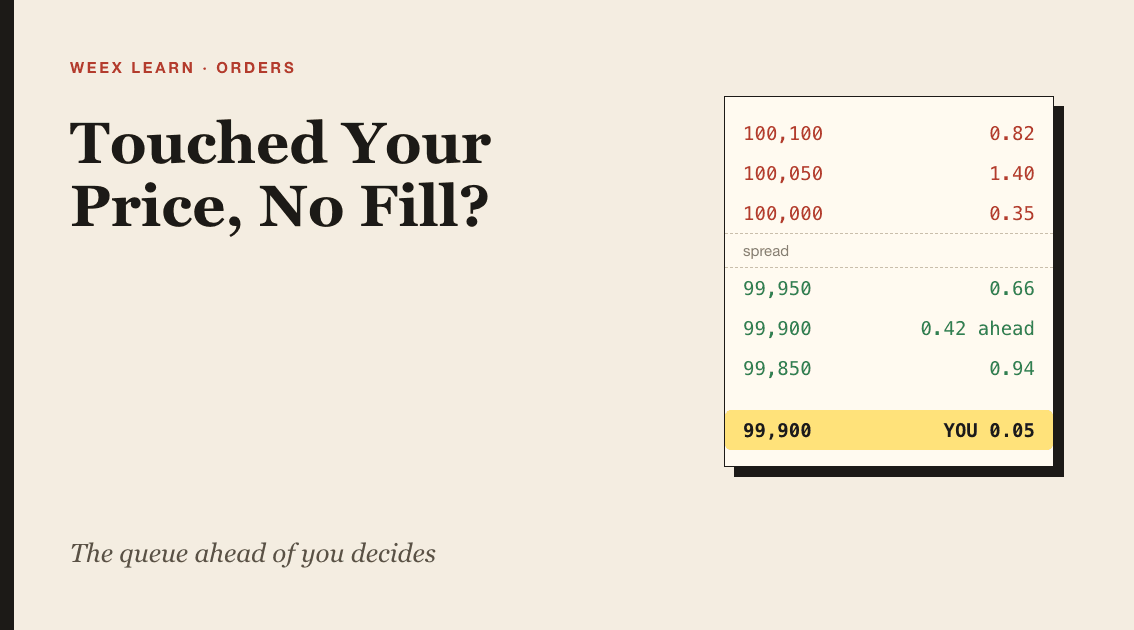
Worked example on the BTC/USDT spot book (illustrative numbers):
- Best ask: 100,000. Best bid: 99,950.
- At 99,900 there are already 0.42 BTC of buy orders resting.
- You place a buy limit for 0.05 BTC at 99,900. You are now last in that line, with 0.42 BTC ahead of you.
Price falls. A large market sell sweeps the 99,950 bids, then 0.30 BTC of it trades at 99,900. All of it goes to the orders ahead of you. The chart prints a trade at 99,900; your fill is 0. Ahead of you: 0.12 BTC.
A second sell of 0.15 BTC arrives at 99,900. The first 0.12 BTC fills the remaining orders in front of you, and 0.03 BTC reaches yours. Status: partially filled, 0.03 of 0.05 executed, 0.02 BTC still open at 99,900.
If price then bounces to 100,200, the last 0.02 BTC may never fill. You own 0.03 BTC at 99,900, about 2,997 USDT worth, and roughly 1,998 USDT is still reserved by the open remainder, unavailable for anything else until you cancel.
Two practical takeaways. A level where big round-number bids cluster, like 99,900 or 100,000, has a long queue, so pricing one tick better (99,910) can put you at the front of a short line. And every time you cancel and re-enter, you go to the back.
Partially Filled Orders: What You Own and What Is Locked
A partial fill is two positions at once: a completed trade and a live order. Read them separately.
- The executed part is final. In the example, 0.03 BTC is yours, and the fee on it has been charged.
- The unfilled remainder still reserves funds. On a buy, the USDT for 0.02 BTC is locked; on a sell, the unsold coins are locked.
- Fees apply only to what executes. WEEX states that fees are not charged on unfilled or cancelled orders. At the VIP 0 spot reference of 0.100% (as of October 2026; confirm your tier on the WEEX fee schedule), the fee on the 0.03 BTC fill is about 3.00 USDT.
Cancelling a partially filled order cancels only the remainder. It does not reverse the 0.03 BTC already bought.
Wait, Re-Price, Cancel or Go Market: Choosing the Fix
Once you know which case you are in, the choice is about what you value more: price or certainty.
- Wait. Right when the price is still near your level and your thesis has not changed. A GTC order keeps your queue position, which is valuable at a crowded price. Cost: locked funds and the chance price never returns.
- Re-price. Right when you still want a limit but the market has moved away. WEEX's spot API exposes cancel and place endpoints but no amend endpoint, so in practice changing the price means cancelling and placing a new order. If your app panel offers an edit option, assume a price change still sends you to the back of the queue at the new level.
- Cancel. Right when the reason for the trade is gone. Cancel removes only the unfilled portion and releases the reserved balance immediately.
- Switch to market. Right when getting filled now matters more than the last few dollars. In the example, finishing the 0.02 BTC with a market buy at a best ask of 100,000 costs about 2 USDT more than the 99,900 limit, plus a 0.100% taker fee of roughly 2 USDT. On thin pairs, slippage can be much larger, so check depth first.
What experienced traders watch: if you keep missing fills by one tick at round numbers, the queue is the problem, not the market. Price slightly inside the crowd. If you keep chasing with market orders after a missed limit, you are paying the spread you were trying to avoid.
To practise placing and managing limit orders, the BTC/USDT spot market on WEEX is the deepest book to start with, and the buy limit order guide covers how to set the entry price in the first place.
FAQ
1. Why did my WEEX limit order not fill when the price touched my level?
Orders at the same price fill in time order. If enough earlier orders were queued at that level, the traded volume filled them first and none reached yours.
2. Does WEEX charge a fee on an unfilled limit order?
No. WEEX states that fees are not charged on unfilled or cancelled orders. You pay only on the executed portion.
3. How long does a limit order stay open on WEEX?
A standard GTC limit order stays open until it fills or you cancel it. IOC and FOK orders do not rest: unmatched quantity is cancelled immediately.
4. Can I edit the price of an open limit order?
WEEX's spot API has no amend endpoint, so the reliable method is to cancel and place a new order. Either way, a new price means a new place in the queue.

Gainers


