


WEEX Stop Loss Not Triggered? Check the Trigger, Then the Fill
When a WEEX stop loss is not triggered, the cause is almost always one of two separate problems: the price source you chose for the trigger never reached your level, or the stop did trigger but the order it placed did not fill at the price you expected. WEEX triggers on last price or mark price, which can sit hundreds of dollars apart in a fast move; after that, the outcome depends on whether a market or limit order was sent. Below, the two halves are split apart, with order status checks and a stop-limit that triggered but never filled.
The fix differs. A stop that never triggered needs a different trigger type or level; one that triggered and slipped or sat unfilled needs a different execution setting. Confuse them and you fix the wrong thing.
WEEX-specific details below come from the WEEX Help Center as of October 2026. Labels can differ between app and web, so check the order panel for exact wording.
First Check: Did It Trigger, Fill, or Get Cancelled?
Before changing settings, find out which state the order ended in. WEEX lists trigger-based orders, including TP/SL, separately from ordinary orders.
- Open Orders, then Trigger. If your stop is still listed here, it has not triggered.
- Order History. A triggered stop's close order appears here. Check whether it filled, partially filled, or was cancelled, and compare the average fill with your trigger.
- Open Orders (regular). A trigger order with a limit price can still sit here, triggered but unfilled. This is the stop-limit trap in the example below.
- Cancellation reason. WEEX's take-profit and stop-loss guide says that when a TP/SL is cancelled because the position changed, the reason appears as "Position Change Cancellation" in order history.
These checks sort almost every case into never triggered, triggered with a bad fill, or cancelled before it could act.
Trigger Side: Last Price vs Mark Price on WEEX
WEEX's TP/SL guide states that you can choose "either the last price or the mark price" as the trigger condition. The WEEX trigger order guide describes the same two options as Market Price (the latest traded price) and Mark Price.
- Last price is the most recent WEEX trade for that contract. It reacts instantly, including to brief wicks from a single large order.
- Mark price, per WEEX, is the spot index price plus a moving average of the futures basis. It smooths short-lived spikes, which is why WEEX uses it for liquidation.
So if the candle wicks through a mark-triggered stop, the stop may correctly not fire, because the chart typically plots last price. A BTC wick to 77,800 on last price can coincide with a mark price that never dropped below 78,300, so a mark-triggered stop at 78,000 stays untouched.
The reverse also happens: a last price stop can fire on a one-second wick the mark price ignored. Last price protects you faster; mark price protects you from noise. Either way, check the price source the stop was watching before concluding it failed.
Execution Side: What Happens After the Stop Fires
A trigger decides when an order is sent, not the fill price. WEEX's slippage explainer puts it directly: the trigger price "is not necessarily its execution price."
What gets sent depends on the tool you used:
- TP/SL attached to a position, or a trigger order set to market. WEEX's TP/SL guide says a triggered TP/SL places a market order to close. It fills in normal conditions, but can fill worse than the trigger when the book is thin.
- Trigger order with a limit execution. WEEX's futures order types guide notes that a limit order placed after triggering "may not get filled during high volatility." This is a stop-limit, and its fill is not guaranteed.
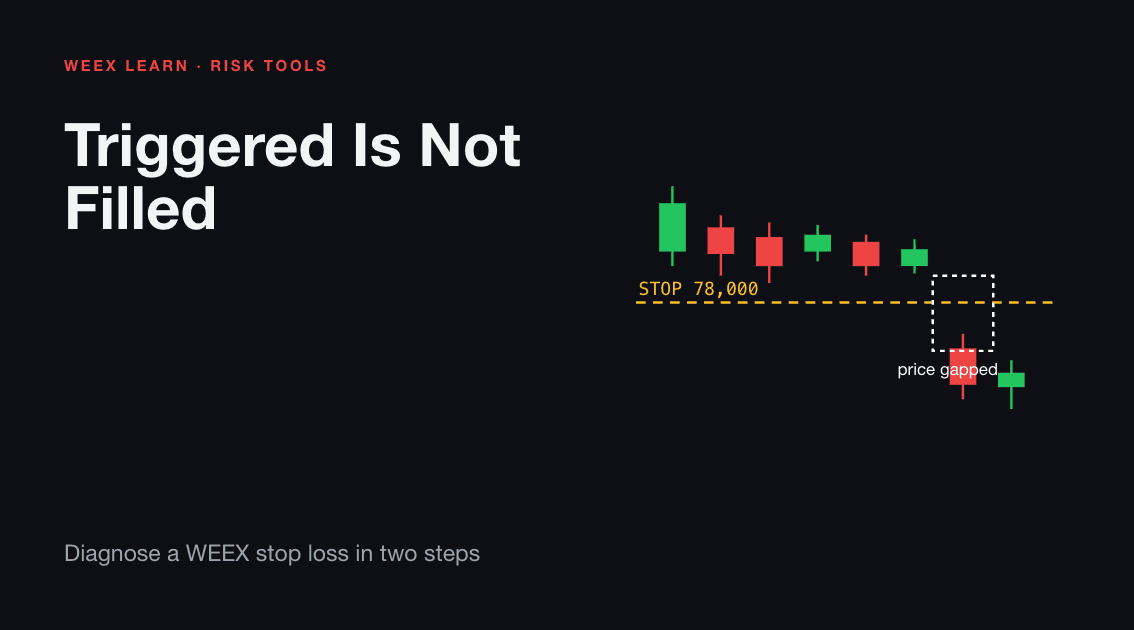
Gaps are the extreme case: if price jumps past your stop with no trades in between, a market close fills at the first available bids and a stop-limit can be skipped entirely.
On eligible pairs, WEEX's Guaranteed Price (GTD Price) toggle closes a stop-loss at the preset price, for an extra fee charged only on fill. No toggle means the pair does not support it.
Worked Example: A Stop-Limit That Triggered but Never Filled
Setup:
- Long 0.2 BTC on BTC-USDT perpetual, entry 80,000 USDT
- Trigger order to close: trigger 78,000 on last price, limit sell at 77,900
- Planned worst-case loss: 0.2 x (80,000 - 77,900) = 420 USDT, before fees
What happened:
- A large sell sweeps the book. Last price prints 78,000; the trigger fires.
- WEEX places a limit sell for 0.2 BTC at 77,900.
- By the time the order reaches the book, the same sweep has already pushed the best bid to 77,600. No buyer is willing to pay 77,900.
- Your sell order now rests above the market. Price keeps falling to 76,800 before bouncing.
- The order is open and unfilled, and the position is fully exposed.
The damage: at 76,800, the unrealized loss is 0.2 x (80,000 - 76,800) = 640 USDT, roughly 52% more than planned. If the price never recovers to 77,900, the order never fills, and the loss keeps growing.
How it shows up: the stop is gone from Open Orders > Trigger, a new limit order sits in regular open orders, and Order History shows the trigger executed. That pattern means an execution problem, not a trigger problem.
What would have changed the outcome:
- A market close (or a position TP/SL, which closes at market) would have filled near 77,600, a loss of about 480 USDT.
- A wider limit, such as 77,200, would likely have filled.
- Guaranteed Price, on a supported pair, would have closed at the stop price for a fee.
Rule of thumb: a stop-limit controls price in calm markets; a market stop gets you out in fast ones. Since a stop loss exists to get you out, it should usually execute as market.
Other Reasons WEEX Cancels or Skips a Stop
Some stops never get the chance to act. WEEX documents several cases:
- Position changed. Manual closing, liquidation, or auto-deleveraging can cancel the TP/SL.
- Margin adjusted. Manually changing margin can shift the liquidation price and cause a TP/SL to fail.
- Liquidation came first. Liquidation follows mark price. A stop set beyond the liquidation price never gets its turn.
- Order limits. Up to 20 TP/SL orders per position, capped at the quantity still available to close.
- Unfilled entry. A TP/SL preset on a limit entry activates only once, and only as far as, that entry fills.
What to Send WEEX Support
If the records still do not add up, send a precise ticket. WEEX's guide to reviewing a liquidated position lists details that apply here too; add your account UID so support can locate the records:
- The trading pair, direction, leverage, and position size
- The order IDs for the stop and any resulting close order
- The exact time of the event, with timezone
- The trigger price, the trigger type you selected (last or mark), and the execution type (market or limit)
- The price you expected and the price you received
- Screenshots of Open Orders > Trigger and Order History, and any error
Compare timestamps with mark price first; many cases resolve there.
FAQ
1. Why did my WEEX stop loss not trigger when the candle went through it?
The chart usually shows last price. On a mark price trigger, the smoothed mark price may never have reached your level during a short wick.
2. Does a WEEX TP/SL execute as a market or limit order?
WEEX's TP/SL guide says a triggered TP/SL places a market order to close the position. Trigger orders let you choose market or limit execution after the trigger.
3. My stop triggered but my position is still open. Why?
Most likely a trigger order with a limit price, and the market moved past it before it filled. Check regular open orders for a resting limit order.
4. Can I avoid slippage on a WEEX stop loss?
On supported pairs, Guaranteed Price closes a stop-loss at the preset price for an extra fee. Otherwise a market stop can fill below the trigger in fast markets.
5. Can a stop loss stop me from being liquidated?
Not reliably. WEEX says not to treat a stop-loss as a guaranteed liquidation barrier. Keep it well inside your liquidation price, which follows mark price.

Gainers


