
WEEX Copy Trading: Can You Set Your Own Leverage and Stop-Loss?

 Prefer us on Google

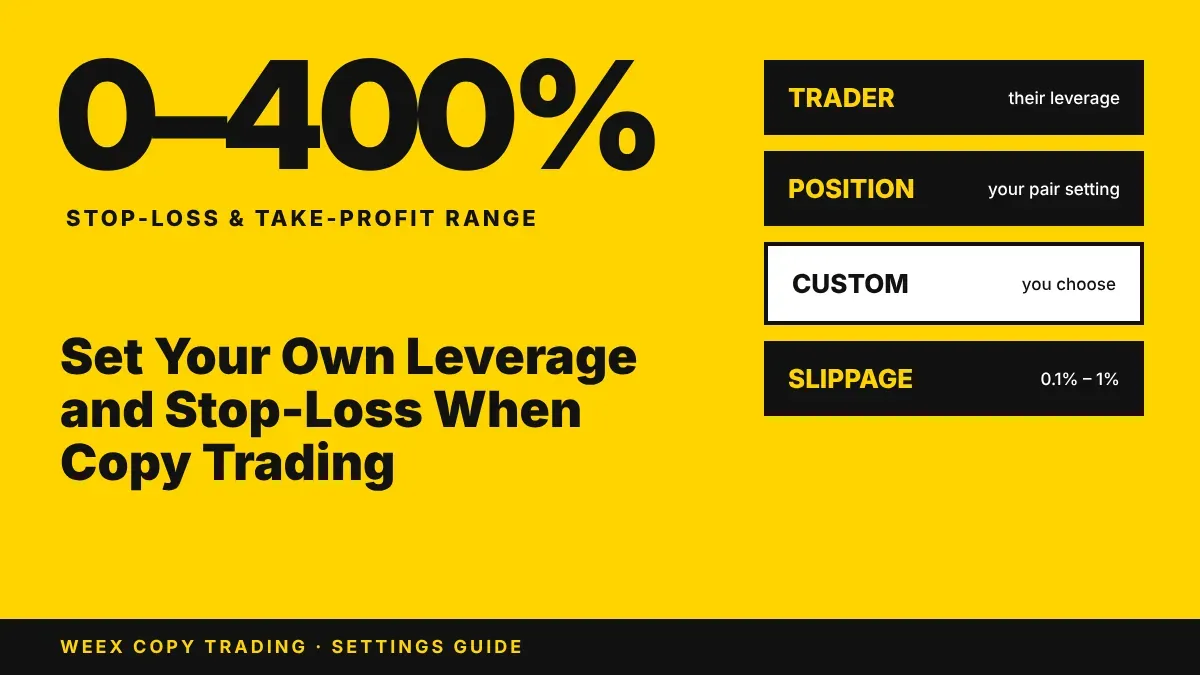
Yes. When you copy a trader on WEEX, you can set your own leverage and your own stop-loss instead of inheriting the trader's. The "Custom" margin mode lets you configure leverage yourself, and every copy setup includes a stop-loss ratio and a take-profit ratio from 0% to 400%, a slippage limit from 0.1% to 1%, and a maximum amount from 10 to 100,000 USDT. This guide explains the three leverage modes, how the stop-loss settings work, a worked example of how leverage changes your risk, and the setup mistakes that cost copiers most.
WEEX's Three Leverage Modes for Copy Trading
According to WEEX's copier settings and risk controls page, checked on November 24, 2026, you choose one of three margin modes when you set up a copy:
- Trader: your copied positions open with the elite trader's leverage. If they use 50x, so do you.
- Position: copied positions follow the leverage you have set for that pair.
- Custom: you configure the leverage for your copy trades yourself.
Since WEEX's March 23, 2026 upgrade, copy trades run in a dedicated Copy Account that is separate from your personal futures account, with its own margin and risk calculations. That means leverage you use for personal trades no longer shares a margin pool with your copy positions.
The better default for most copiers is Custom. Trader mode is the easiest to set up, but it hands the most important risk decision to someone else.
How Stop-Loss and Take-Profit Work for Copiers
WEEX gives copiers four risk controls on every copy:
- Stop-loss ratio: 0% to 400%.
- Take-profit ratio: 0% to 400%.
- Slippage ratio: 0.1% to 1%. If your entry would be worse than the trader's by more than this, the copy is skipped.
- Maximum amount: 10 to 100,000 USDT, a ceiling on how much you commit to that trader.
You also choose how much to copy per trade: a fixed ratio of 0.01 to 100 times the trader's size, or a fixed amount of 10 to 10,000 USDT.
These settings are yours alone. The trader's own stop-loss, which elite traders can set by price or percentage on their elite positions, does not replace yours. If the trader moves or removes their stop, your ratio still applies. For more on the slippage setting specifically, see our guide to the WEEX copy trading slippage limit.
Worked Example: Same Trade, Different Leverage
Leverage decides how fast a price move eats your margin, which is why the mode you pick matters more than any single setting.
Suppose you copy a long BTC position with 100 USDT of margin and the price falls 4% before the trader exits:
- At the trader's 50x: a 4% move against you equals about a 200% loss on margin, so the position is liquidated long before the trader closes.
- At a custom 10x: the same 4% move is about a 40% loss on margin, before fees.
- At a custom 5x: it is about 20%.
Same trader, same entry, same exit, three very different outcomes. The figures ignore fees and funding and are only an illustration, but the shape holds: at high leverage, the trader's stop may never be reached on your account.
-- Price
How to Set Custom Leverage and a Stop-Loss on WEEX
The interface labels can change between app versions, but the flow on the copy trading page works like this:
- Open WEEX Copy Trading and pick an elite trader from the leaderboard.
- Select Copy, read the copy trading terms, and choose the futures pairs you want to follow.
- Under margin mode, select Custom and enter the leverage you want.
- Choose the copy amount as a fixed ratio or fixed USDT.
- Open the risk control settings and enter your stop-loss ratio and take-profit ratio, then set slippage and maximum amount.
- Make sure your Copy Account holds enough funds, then confirm.
If your Copy Account lacks funds for the amount you chose, the copy fails and WEEX sends a system notification.
Setup Mistakes That Cost Copiers Most
Leaving stop-loss at zero. A ratio of 0% means no stop at all. If the trader holds a losing position, you hold it too.
Matching a high-leverage trader at full leverage. A trader with a large account can survive a drawdown that liquidates a 100 USDT copy at the same leverage.
Setting the maximum amount too high. The cap is the only control that limits your total exposure to one trader across all their trades.
Assuming your futures balance funds your copies. Since the 2026 upgrade, only the Copy Account does.
Experienced copiers usually decide leverage and stop-loss before choosing a trader, not after. Before you size anything, check the trader's maximum drawdown and whether they have losing positions still open.
FAQ
1. Does WEEX let copiers use different leverage from the trader?
Yes. The "Position" and "Custom" margin modes let your copied positions use leverage other than the trader's. Only "Trader" mode copies the elite trader's leverage.
2. What is the stop-loss range for WEEX copy trading?
Copiers can set a stop-loss ratio and a take-profit ratio anywhere from 0% to 400%, according to WEEX's copier settings page.
3. If the elite trader has a stop-loss, do I still need one?
Yes. The trader's stop protects the trader's position. Your own ratio is the only stop guaranteed to apply to your copy, especially if you use different leverage.
4. Can I change my copy settings after I start copying?
You can edit settings for future copies from the copy trading page. To cut risk on positions already open, close them manually from "My copy trades".
This content is provided for general informational purposes only and doesn't constitute financial, investment, legal, or tax advice. Any events, rewards, online promotions, or related information mentioned herein should not be considered a recommendation, solicitation, or invitation to purchase, sell, trade, or otherwise deal in any crypto assets. Crypto assets are highly volatile and may result in loss. The availability of WEEX services, products, and related events may vary by region. You are responsible for ensuring that your participation is in accordance with applicable local laws and regulations.
You may also like
View moreWEEX Elite Trader Support: Exposure, Levels, Fund and Payouts
Beginner3 minCopy TradingCan You Close a WEEX Copy Trade Early? How to Take Profit Now
Beginner3 minCopy TradingHow Copy Trading Platforms Stop Churning and Bag-Holding Traders
Beginner4 minCopy TradingHow to Use Flicker with WEEX to Review Crypto Trades
Beginner5 minHow to Become a WEEX Elite Trader: Levels, Rules and Profit Share
Beginner3 minWEEX Copy Trading Slippage: How to Set the 0.1% to 1% Limit
Beginner3 min


